Monday, March 11, 2013

Breaking it down further (Application Tier)

As mentioned in my earlier posts, the logical tiers that make up "Application Architecture" are (in my mind) the Client Tier, Application Tier, and the Integration (or Data) Tier. Some of the application architecture tiers can be further broken down into logical layers.

As application designers/developers/architects, we are generally most concerned with the Application Tier, because that is where the bulk of most application logic and functionality reside (with the notable exception in the Web 2.0 world that is moving more and more presentation and business logic down to the client tier, but that is another matter).

Application Tier
For design purposes, the Application Tier can then be further broken down into into several discrete Application Layers, which provide a logical separation of concerns for our application.


As you can see, the application layers include:
  • Presentation Layer
  • Business Layer (Services and Objects)
  • Integration/Data Layer
Presentation Layer
The aptly named presentation layer is pretty much exactly what you would expect.  It is the presentation of the application to the user, delivered generally as a group of UI components as well as UI Process components.  It basically orchestrates the response to any application requests, which for web applications are generally HTTP requests originating from a browser (web service applications are a bit different in implementation, but similar in concept).

Depending on the nature of the application and the technologies in place, this layer can be delivered as a wide variety of components.  Regardless of the technologies used, one over-riding pattern that is generally considered the best approach for managing the interactions between UI and UIP components is the Model-View-Controller (MVC) pattern, whose responsibilities include:
  • receiving and handling user events, acting as the overall request "controller"
  • calling out to service classes to build the "model" data for the response
  • creating appropriate "view" responses and sending to the caller
An interesting point that is often overlooked is that the Presentation Layer is generally the only "stateful" layer within the application architecture (since it is responsible for managing the user sessions/state). Ideally, the Business and Integration/Data Layers of an application are "stateless" (to open up the possibility for re-use of these components by other clients/callers).

Business Layer
The business layer is where the 'guts' of the business logic is stored.  This is generally where the real functionality of the application is implemented.  Components in this layer are generally structured around real-world business concepts, and encapsulate the business logic (or business rules) for the application functionality being delivered.

Many times, these functions are broken down into more logical services (aka Business Services), and delivered through some sort of application facade, often referred to as a Service Interface.  Now, this doesn't necessarily mean that it uses Web Services, but that is one method for having a more technology-agnostic approach for developing business functionality and making it available to applications leveraging multiple technology stacks.

Similarly, there are often software components that represent their real-world counterparts that are often called the Business Objects (like Invoice, Employee, Customer, etc.).  These are generally just containers for managing related data and presenting it in a meaningful way.  While these objects often originate in the Business Layer, they can be used to pass the structured data between layers (to the Presentation Layer, for example).

Integration/Data Layer
The Integration Layer is the interface for the Business Layers to interact with any enterprise systems (including databases).  This is where the distinction between Layers and Tiers is most useful.  Most business applications are centered around delivering "data", which often resides in some sort of back-end repository, like a database (although there are many other possibilities, like ERP systems, LDAP trees, Web Services, etc.).  The components in the integration layer (or data layer) are responsible for exposing the data from these repositories to the business layer.

The Integration Layer is often implemented using Data Access Objects (DAO) for database access or Adapters for other enterprise integrations (Web Services, RSS, etc.).  Continuing the practice of separating design from implementation, one preferred approach here is to define an interface for the DAO, like StudentDao, and then provide an appropriately named implementation, like JdbcStudentDao (if JDBC based, could also be HibernateStudentDao).

As just mentioned, Object-Relational-Mapping tools (ORM) like Hibernate are another option for the Integration/Data Layer, but they can add a level of complexity that is not always required for business applications (particularly those that are "view-only").

Stored procedures are an interesting case., and can complicate the logical separation of layers and tiers.  While the stored procedures can often contain "business logic" that would be considered part of the Application Tier, the actual implementation (code) resides within the database itself - on the Data Tier.  This murkiness is generally undesirable, and as such I generally prefer to avoid stored procedures when possible.  There are cases when their use makes sense, but keep in mind that it can complicate your application architecture.


Saturday, February 23, 2013

Breaking it down further (Integration/Data Tier)

As mentioned in my earlier posts, the logical tiers that make up "Application Architecture" are (in my mind) the Client Tier, Application Tier, and the Integration (or Data) Tier. Some of the application architecture tiers can be further broken down into logical layers. The Integration/Data Tier generally doesn't fall into that category, so I'll just spend a little time talking about what I mean when I refer to the Data Tier (from now on, I'll generally refer to this as the "Data" tier, as that is what is most often used in business applications).

Integration/Data Tier
The Data Tier is generally responsible for managing the persistent application data. This data management typically includes:
  • Storage/retrieval of data
  • Managing updates to the data
  • Allowing simultaneous, or concurrent access (by more than one middle-tier process)
  • Providing security for, and ensuring the integrity of the data
In most business applications, these services are provided by a RDBMS. However, the Integration/Data Tier is used to refer to whatever back-end repository is being used as a persistence mechanism for the relevant application data (ERP system, image repository, web service, etc.).
Frequently (but not always), the database is separated physically onto its own tier. However, the performance of an application can suffer greatly if this physical separation from the application tier is too great. When planning the application, work with the appropriate teams (e.g., enterprise architecture, DBA, etc.) to determine the appropriate physical server location and configuration for your Data Tier - taking into account the Application Tier (which will be discussed next).

Saturday, February 16, 2013

Breaking it down further (Client Tier)

As mentioned in my earlier post, the logical tiers that make up "Application Architecture" are (in my mind) the Client Tier, Application Tier, and the Integration (or Data) Tier. Some of the application architecture tiers can be further broken down into logical layers (see my previous blog about how I differentiate between "tiers" and "layers"). Let's start with the Client Tier.

Client Tier
These days, the client tier generally maps to the browser, as is the case with any web application. When referring to "Client-Server" type applications where there is a separate application client program installed on the client machine, things are a little different (and there would be cases where it makes sense to break this down into logical layers), but in the web-world, the client is generally used only as a presentation vehicle for the application user.

The Web 2.0 model has complicated that a bit as well (with AJAX having the potential to move functionality/business logic to the Client Tier). This would be another case where it makes sense to break the tier down into additional logical layers. However, that is a topic for another day.

Thus, the Client Tier (for non-AJAX web applications) is generally responsible for:
  • Display of HTML resources
  • Issuing HTTP requests for resources,
  • Processes HTTP responses
Generally, this means that the Client Tier will be mainly interacting with the Application Tier, sending requests and receiving responses that are then rendered for the user. Pretty straightforward stuff here (except when you bring this whole "Web 2.0" thing and the AJAX that goes along with it).

Saturday, February 9, 2013

Application Architecture - Tiers or Layers?

While application architecture is complicated enough by itself, the ambiguity or multiple interpretations of words or concepts adds yet another wrinkle. One example of this that I've run into recently has to do with the separation of the logical and physical components within an application.

Most developers/architects will agree that there are (at least) 3 separations that are meaningful enough to warrant their own grouping:
  • Client "stuff"
  • Application "stuff"
  • Data "stuff"
But are these "layers" or "tiers"? There are a lot of people that use these terms interchangeably, and until somewhat recently, I did too. That changed while I was doing some online research to pull together documentation for a recent project.

I stumbled upon a couple of articles that made a differentiation between the two that I think makes a lot of sense (thanks to Pranshu Jain's Blog and the Guidance Share Wiki for their insight).
Physical separation versus logical separation is the distinction. If the layers are physically separated (or have the potential to be physically separated), then they can be referred to as tiers. Logical separation (particularly for design concerns) is indicative of architecture layers.

So, as mentioned above, most web applications have 3 tiers:


I plan to continue to use this distinction moving forward, because I think there are some places where it can really add value (which I will discuss in more detail within future blog entries).

Friday, January 25, 2013

JavaMail Quirk

While creating a fairly simple program recently, I stumbled upon some odd behavior with the latest release of the JavaMail API (1.4.5).  OK, maybe its not that odd, but it seems different from how I remember things.

Basically, one of the requirements for the program is to send emails with file attachments.  No real text is required within the email body.  It should be no surprise that I'm using the Spring Framework for this project, and as such I am using the MimeMessageHelper to create my message and then send it.

The issue arises when I try to send an email without any body text.  In this case, here is the error that I see:

org.springframework.mail.MailSendException: Failed messages: javax.mail.MessagingException: IOException while sending message;
  nested exception is:
      java.io.IOException: javax.mail.MessagingException: Empty multipart: multipart/related;
      boundary="----=_Part_1_30254491.1359131496129"; message exceptions (1) are:
Failed message 1: javax.mail.MessagingException: IOException while sending message;
  nested exception is:
      java.io.IOException: javax.mail.MessagingException: Empty multipart: multipart/related;
      boundary="----=_Part_1_30254491.1359131496129"

Not very informative, is it?

After doing some research (aka lots of googling), I found out that the MIME spec apparently does not allow multi-part messages with no body parts (see javadoc).

There are two ways to get around this:
  • Simply add some text to the body of the message (easy)
  • Turn off this restriction which prevents empty messages
Fortunately, if your requirements dictate an email with no body, you can change the default behavior by setting a system property:

System.setProperty("mail.mime.multipart.allowempty", "true");

Hope this helps someone save some time in the future...


Friday, April 8, 2011

Even better tool for testing Web Services (soapUI)

I know that awhile back I was extolling the virtues of tcpmon, but I've since stumbled upon an even better tool to use for testing web services - soapUI. Here is where to get it:

http://www.soapui.org

This is a open source tool from eviware that is licensed under the terms of version 2.1 of the GNU Lesser General Public License. There are several versions of the tool available on a few different platforms. It integrates with most major IDEs, including:
  • Eclipse
  • NetBeans
  • Intellij
There is also a 'Pro' version that is vendor-supported (with enterprise users in mind). So far, I have only used the freely available eclipse plugin. It is a very handle little tool for creating, sending, and receiving SOAP messages. Here is what it looks like:


Its pretty simple to use - just point it at the WSDL file, and it will create a test SOAP request envelope that you can edit prior to sending. And then you can view the fill SOAP response (including the transmission details, if desired).

If you are looking for a tool to produce SOAP messages/responses, look no further...

Tuesday, March 22, 2011

Managing certificates with Java (the keystore is the key)

This is not a very difficult task, but I'm putting out here to mainly help me remember the syntax for the keytool utility (that comes with the JDK).

How to install a certificate:
  1. Procure the desired certificate for installation into the keystore and copy it to the keystore installation location (see additional instructions at the end for details on how to do this from different browsers (if you don't already have the *.cer file).

  2. Open a command window and navigate to the appropriate directory containing the keystore that you wish to modify (e.g. C:\Program Files\Java\jdk1.6.0_10\jre\lib\security\cacerts is the default keystore).

  3. Execute the following command to import the certificate (from the *.cer file) to the keystore:

    keytool -import -file newcertificate.cer -alias new-certificate-name -keystore keystore-name

    where:

    newcertificate.cer is the name of the certificate file
    new-certificate-name is the name used to store that certificate (doesn't really matter, just something descriptive)
    keystore-name is the name of the keystore being updated (e.g. cacerts).
How to view the certificates already installed in a keystore:
  1. Execute the following command to list all of the certificates in the keystore:

    keytool -list
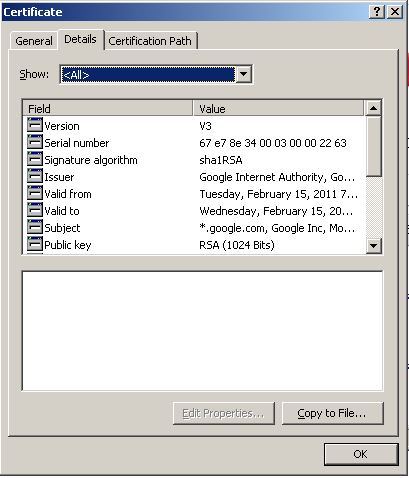
How to retrieve a certificate using your browser:
  1. Navigate to the desired URL (using https://), then depending on your browser, there are several ways to retrieve the cert:

    IE
    Either click on the small padlock icon in the lower right corner, or select File | Properties | Certificates from the menu.


    Then, select Details | Copy To File, and it will launch a wizard to export the certificate to a file (I typically use Base-64 encoded X.509)


    Firefox
    Very similar process, but instead of clicking the padlock, you click the highlighted logo on the left side of the address bar.


    And then select More Information | Details | View Certificate | Export.


Friday, February 11, 2011

More clouds...

I recently stumbled upon a couple articles that I think do a pretty good job at providing some more clarity around 'cloud computing'.

Cloud computing service models by Dan Orlando (IBM developerWorks)

Cloud Computing - A Primer by T. Sridhar (Cisco Internet Protocol Journal)

These are not necessarily vendor-neutral, but do add some detail about common terms and characteristics to be aware of related to cloud computing. Things like:
  • elasticity
  • virtualization
  • resiliency
  • multi-tenancy
  • cloudbursting
Another thing that was covered is the movement towards standardization (which seems to be slow at best). The goal here is to minimize the effect of vendor-lock in (which is not really a motivator for most vendors).

However, there seem to be a couple efforts underway that look promising:

Tuesday, November 23, 2010

To the cloud???

Many of you have likely seen the latest commercials from Microsoft using the tagline "To the cloud...". If you're like me (and probably most other people that are in IT), you've probably tried to figure out what a couple of people at the airport looking at family photos or watching TV has to do with this new buzzword "Cloud Computing"(or I guess that its more accurate to call it a buzz-phrase).

Well, I wish I could answer that question, but in an attempt to help wrap my head around this latest paradigm, I'll try to organize my thoughts around some of the concepts of cloud computing.

When talking about cloud computing, there are a couple of types of clouds that come up, mainly
  • private clouds
  • public clouds
Public and Private Clouds are just what you would expect them to be. Public clouds are generally computing infrastructures that were set up by some service provider to "sell" as a service to its customers. Private clouds are similar computing infrastructures, but generally created and maintained by an organization for its own use. Easy enough so far.

Regardless of whether or not it is public or private, the bigger question is "What the heck is a cloud?". Well, like a lot of new technology buzzwords or concepts, the answer is often "It depends". In this case, there seem to be many different "levels" for computing within a cloud. One good way of classifying the cloud computing options is to look at the level of the stack that they are servicing. With this approach, there appear to be a few different options for providing solutions from the cloud:
  • IAAS (Infrastructure As A Service)
  • PAAS (Platform As A Service)
  • SAAS (Software As A Service)
  • DAAS (Desktop As A Service)
IAAS
This seems to be the cloud offering that is at the lowest level of the stack. It is generally a computing infrastructure that is provided to the client (essentially at the operating system level). This is somewhat analogous to "virtualization", where a single physical machines can be partitioned and then treated as multiple logical machines (just on a different scale, with many physical machines serving as many more logical machines). However, it can sometimes be the inverse, with many physical machines looking like a single logical machine (more of a clustering approach). All of this is somewhat transparent to the individual logical machines.

PAAS
The Platform As A Service approach takes it up another level, generally providing some sort of software or application stack as part of the service (like a Java Application Server with a Database implementation, or a LAMP stack, or some other similar offering). This offering is generally considered as a deployment infrastructure for an application that can shrink and grow with user demand for that application.

SAAS
This approach takes it up yet another level, generally offering some sort of application as a service from the cloud. The classic example for this type of cloud offering is Salesforce.com (SFDC). Where it comes a bit more challenging in my mind is how to separate this from normal web applications. What is different in an SAAS offering that makes is "cloud"? Or is it just a fancy way of saying web application? For example, would you consider most online email offerings as "cloud" applications (or SAAS)? If that's the case, you can probably roll in Google Apps, as well as other web-based application services (including the software used to run this blog).

DAAS
The Desktop As A Service is a relatively newer term (at least to me), but the concept has been around for some time. It is roughly analagous to the desktop virtualization and conceptually similar to the platform virtualization discussed above. It seems to be a fancy method of referring to some of the remote access and remote control technologies used in the past, and not really indicative of the cloud computing movement that most enterprise vendors are pushing (near as I can tell).

In fact, referring to DAAS as a "cloud" technology doesn't quite make sense to me, but this seems to be at least part of Microsoft's vision for the cloud (based on the commercial that I mentioned in the beginning of this post, where there are a couple of people stuck at an airport, and appear to connect to their home PC over the web and look at photos or watch some recorded TV shows).

As you can see, there are many differing visions for this "cloud" future (depending on which vendor you ask), and I'm still not quite sure which one I buy into. In reality, I suspect there is a place for several, if not all, of these versions of the cloud. Like all other technology solutions, the correct choice will likely depend on the business problem that you are trying to solve...

Wednesday, September 15, 2010

Troubleshooting Web Services (tcpmon)

I stumbled across a useful little tool this week while struggling with the IBM Content Manager Web Services server. If you need to get a look at the SOAP requests and responses getting passed over the wire, here is a cheap (as in free) utility - its called tcpmon.

I think it was originally started under the Apache Axis project, but it is now hosted on java.net (click here to go to the tcpmon homepage).

While there are also commercial tools to do this, its always nice to find a simple and free tool that gets the job done. Its a pretty intuitive utility, that basically acts as a go-between for the client and server, echoing any tcp traffic that passes through it.

I won't go into too many details (there are plenty of other tutorials available on the internet, just a google away), but one thing worth pointing out is how to configure the target host and your client for the web service (since most of the examples don't contain any path info on the URLs, which is pretty common for any web service requests).

First, if the URL of your web service is http://my.service.com/services/myservice, configure tcpmon like this:


And then, when you create your client stub for the web service (if you are using Axis2 and pass in a String for the target endpoint), create it this way:


MyWebServiceStub stub = new MyWebServiceStub("http://localhost/services/myservice");


Instead of the normal way, without the tcpmon as the "man-in-the-middle".

MyWebServiceStub stub = new MyWebServiceStub("http://my.service.com/services/myservice");

A couple of other points worth mentioning:
  • It can run as a standalone app (from a downloaded jar file) or over the web via JNLP. The 'official' version is also available as a NetBeans plug-in.
  • Some enterprising developers also ported a plug-in version for eclipse available here (thanks guys). The main benefit here is that it is just runnable within eclipse, with the GUI visible as a console view. Installation is simple - just drop the jar file into the plugin folder for eclipse (.../ECLIPSE_HOME/plugin/).
  • One thing I noticed within the GUI for the eclipse plug-in is that it also seems to have support for a proxy server (as a firewall pass through to external URLs). I don't see similar configuration options on the standalone version (not sure if this is a difference or not, but thought it was worth mentioning).
  • If you run into trouble getting everything connected (getting a java.net.UnknownHostException), consider trying both the listener and target port to 80 (in case there are firewalls, or other security settings affecting communication over nonstandard ports that are often suggested in the tutorials).
  • It can also be beneficial to just try configuring connectivity to a simple html page, to understand the setup before trying to snoop on a web service (paths, etc.)
Thanks to Charitha Kankanamge's Blog for pointing me in the right direction...

Monday, March 8, 2010

Code Syntax Highlighting - The Sequel

Time for an update. I've followed the advice of some fellow bloggers and configured the Syntax Highlighter JavaScript library.

Here's the world famous highlighter at work:


// Hello.java
import javax.swing.JApplet;
import java.awt.Graphics;

public class Hello extends JApplet
{
public void paintComponent(Graphics g)
{
g.drawString("Hello, world!", 65, 95);
}
}

So, was that worth the wait?

For the record, it wasn't really that hard, but I still think its something that should be built into the blog editor.

Thanks to Alex Gorbatchev, Carter Cole, Hendy Irawan, and all the other posters that helped get me here...

Thursday, March 4, 2010

Technical Blogs (Code Syntax Highlighting)

I realize that I am relatively new to blogging, but I have to say that I am a bit surprised at the immaturity of some of the editing capabilities built into most blogging platforms (mainly in the formatting options that are available).

I've used plenty of wiki platforms that have very nice code formatting tags (along with many, many others) built right in, but apparently the easiest way to show some Java code examples on blogger is to use the SyntaxHighlighter JavaScript libraries from Alex Gorbatchev.

I'm not looking for anything fancy, just something simple, like this:

// Hello.java 
import javax.swing.JApplet;
import java.awt.Graphics;   

public class Hello extends JApplet 
{     
   public void paintComponent(Graphics g) 
   {         
      g.drawString("Hello, world!", 65, 95);     
   }     
}

One answer is to just copy and paste from another HTML/wiki editor (like I did above), but that seems like too much of a kludge to the developer in me. The blogger editor didn't really like it, it wasn't very clean, and I lost some of the formatting (courier font, etc.). There's got to be a better way.

After searching longer than I should have, for something that I figured would be a very easy thing (display code in a blog), I've found a couple posts that lay it pretty clearly. And honestly, I'm sure its not that hard, but to me this seems like a pretty big oversight (aren't blogs typically targeting a relatively technical audience, and I think code would be a pretty frequent topic for display in a blog).

I apologize if this comes across as being harsh, but I still remember the first time that I used an editor that had color syntax highlighting (yes, I know that I am dating myself, and yes, I said editor and not IDE, because thats all it was - TextPad, for those of you that are familiar). After my first experience with syntax highlighting, I was hooked - coolness factor aside, I think its a huge productivity boost and development aid. It was probably one of the first steps towards many of the productivity gains offered by today's IDEs (maybe that's a topic for another day?)

Maybe I'm wrong about blogger's capabilities, so please tell me if there is an easier way to do this. Otherwise, I guess that I'll get to work on pulling those JavaScript libraries into my blog template, so that I can actually start on the next post that I was planning...

Thursday, February 18, 2010

Annotations - Good, Bad, or Ugly?

In my workplace, we are currently in the process of moving towards JDK 1.5 (I know, we're not on the cutting edge of technology, with many apps still on JDK 1.4 and even 1.3).

As such, I am finally taking the time to dig into some of the newer Java features. Annotations are one item that was introduced with JDK 1.5 (or I guess its called Java 5 now) that I haven't made up my mind about yet.

Annotations, simply put, are a facility within Java for providing meta-data about code. From what I can tell so far, there are a couple different flavors (or uses) for this meta-data:
  • documentation (acting essentially as a form of structured comments within the source code)
  • compiler information (to provide a little clearer instructions to the compiler about how to handle the code - things like @Deprecated, @Override, @SuppressWarnings are all pretty clear in what they are telling the compiler)
  • specialized processing (I suspect that this will more likely be used by frameworks, etc.)
In fact, my main exposure to annotations so far are from the Spring documentation (can you tell that I'm a fan of Spring?) It seems to be a way to remove some of the restrictions based on naming conventions, as well as a means of simplifying the XML configuration files (which I admit can get cumbersome).

I can see some advantages for using annotations, but I can also see it getting easy to mix in environment specific or configuration information that really shouldn't be embedded in the code.

More to come on this topic, but to answer the question posed in the title of this blog, I suspect its going to be like many other technologies - has some benefits when used properly, but can be easily abused (or used for the wrong reason).

Friday, February 5, 2010

Oracle + Sun = ???

I know that this whole thing started long ago, and there's been a lot said (and written) about this topic, but I still haven't made up my mind about the overall impact. Particularly on Java - which is near and dear to my heart. Their main emphasis so far seems to be on the fact that they can now offer the full stack; from low-level hardware to software, including multiple enterprise applications spanning several verticals. But what is this going to mean to the peons that are still in the trenches, slinging code every day?

On the one hand - we now have a company with deep pockets and the ability to invest in Java as a platform. Oracle is saying that they plan to hire close to 2,000 people, many of which are expected to be technical (engineers, etc.). You might expect this to create significant growth in Java, along with better (and simpler) integration with all of the software/tools/frameworks already under the Oracle umbrella.

They are also pledging "certified" systems and unique support opportunities, where there is only "one place to call' to resolve issues. While this all sound great in the board room, how is this going to translate in the real world?

Well, I don't have the answer to that, other than to say that the only certainty is that things will change. Particularly in areas where there is clear overlap between the Sun and Oracle offerings, things like:
  • Development tools - I don't see JDeveloper and NetBeans co-existing (and Oracle has made no secrets about sticking with its "own" tools as the strategic direction for most products).
  • Application servers - While GlassFish is touted as the reference implementation with and "enterprise-ready" feel, it pretty clearly overlaps the current Weblogic offering.
  • Database servers - Clearly, no one expects MySQL to just go away, but its hard to know how that will play with product that drive Oracle's rise, their own flagship database.
There are other cultural differences that may play into things too - regarding open source directions, Java Community Process, and general approach to innovation Sun had more of a history of supporting projects that looked innovative, regardless of whether or not they would lead to real revenue. While this may have been a factor in their demise, I still am concerned about the prospects of losing choices in these areas.

I guess we'll just have to wait and see what the future brings, but if history is any indicator, I don't think the change will happen overnight. These things always take time...

Friday, January 29, 2010

Learning Java? Look at Spring

For those that are learning Java, or those that want to improve their skills, I highly recommend learning about the Spring framework.

Initially, just using it will help enforce good design principles within your applications, but if you want to truly grow as a developer (and designer), you should dig into the details and understand the implementation of Spring. It applies good design principles consistently (like separating interface from implementation), and can be a good reference for understanding how to use design patterns. For example, JdbcTemplate is a classic use of the Template pattern (or Template Method, depending on who you ask).

In fact, the JDBCTemplate is probably the best place for those that are new to Spring to get started. It is a valuable addition to most applications that use JDBC, even if no other Spring services are utilized. It can be a straightforward introduction of Spring into an application (or even an organization). It really simplifies the use of JDBC by handling much of the common plumbing work that is required, and lets the developer focus on the business logic.

By understanding how these patterns are applied within Spring (and the the problems that they are solving), you will begin to recognize similar problems in the applications that you build - and apply the appropriate patterns to solve them.

Its as simple as starting with the javadoc to look at the class structure and hierarchy, but I would encourage you to go further and actually step through the running code in a debugger to be sure that you understand the call path - I have always found the debugger to be an invaluable resource when trying to understand code behavior.

Monday, March 23, 2009

Is this the final Eclipse, or will Sun be fine in a Big Blue sky?

The recent rumors about IBM purchasing Sun present some interesting considerations.  The biggest question is whether IBM is interested in the hardware assets, software assets, or both?

The most obvious question is about the future of Java - with IBM in control, would Java become more or less open? What would become of the JCP? IBM would likely want the ability to exert influence over its new baby, so there could be big changes in store...

Being a Java developer, some the other overlaps between IBM/Sun products give me cause for concern:
  • Servers - WebSphere is well established, what would happen to the less than successful server initiatives from Sun (Glassfish, etc.).  Would they continue to receive any support from IBM?
  • Tools - Which IDE will win? NetBeans or Eclipse? 
  • Databases - MySQL or DB2? Yet another conflict here (perhaps less of an issue, given the target markets).
  • Operating Systems - Solaris or AIX?
I guess we'll have to wait and see if anything comes of this, or if the rumors go away as quickly as they started.  For some reason, I doubt the latter.....

Tuesday, March 17, 2009

What's in a name?

Like I mentioned previously, I'm reading the book "Clean Code" right now.  Great book.  There are lots of great tips on how to write clean code. There's a whole section dedicated to naming (and rightly so).  

Its easy to overlook how important it is to use care when naming classes, methods, variables, etc. Two of the tips seem like statements of the obvious, but I have found to be more valuable than one might guess:
  • Use Pronouncable Names
  • Use Searchable Names
Pronouncable names make it easy to discuss the code with other developers, which leads to better code (and a better understanding of the code by the development team).  Searchable names make it easy to find specific parts of the code that you may need to come back to at some later date.

These two simple items will make your life much easier over the long haul (since we all know that often the code we write lives much longer than we ever expected it to...).

Saturday, March 14, 2009

Good books for programmers

Clean Code: A Handbook of Agile Software Craftsmanship
Right now, I'm reading "Clean Code: A Handbook of Agile Software Craftsmanship" by Robert C. Martin.  This is a great book - a lot of tips that sound like common sense, but are often ignored (even by seasoned developers). This book does a nice job of codifying the best practices of some of the industry's best programmers.

Refactoring
Another book that is great for younger developers that are looking to grow their skills and improve the applications that they develop. "Refactoring: Improving the Design of Existing Code", by Martin Fowler talks about the process of gradually taking an application and improving it incrementally to "fix" the design (plenty of additional knowledge is gathered in the development process, so at some point a developer needs to go back and apply that to the design).

There are plenty of others:
  • Effective Java - Joshua Bloch (more good tips)
  • Practical Java - Peter Hagger (yet another collection of good practices)
  • Expert One-on-One J2EE Design and Development - Rod Johnson (a pre-curser to his work on the Spring Framework)
What else???