Saturday, February 23, 2013

Breaking it down further (Integration/Data Tier)

As mentioned in my earlier posts, the logical tiers that make up "Application Architecture" are (in my mind) the Client Tier, Application Tier, and the Integration (or Data) Tier. Some of the application architecture tiers can be further broken down into logical layers. The Integration/Data Tier generally doesn't fall into that category, so I'll just spend a little time talking about what I mean when I refer to the Data Tier (from now on, I'll generally refer to this as the "Data" tier, as that is what is most often used in business applications).

Integration/Data Tier
The Data Tier is generally responsible for managing the persistent application data. This data management typically includes:
  • Storage/retrieval of data
  • Managing updates to the data
  • Allowing simultaneous, or concurrent access (by more than one middle-tier process)
  • Providing security for, and ensuring the integrity of the data
In most business applications, these services are provided by a RDBMS. However, the Integration/Data Tier is used to refer to whatever back-end repository is being used as a persistence mechanism for the relevant application data (ERP system, image repository, web service, etc.).
Frequently (but not always), the database is separated physically onto its own tier. However, the performance of an application can suffer greatly if this physical separation from the application tier is too great. When planning the application, work with the appropriate teams (e.g., enterprise architecture, DBA, etc.) to determine the appropriate physical server location and configuration for your Data Tier - taking into account the Application Tier (which will be discussed next).

Saturday, February 16, 2013

Breaking it down further (Client Tier)

As mentioned in my earlier post, the logical tiers that make up "Application Architecture" are (in my mind) the Client Tier, Application Tier, and the Integration (or Data) Tier. Some of the application architecture tiers can be further broken down into logical layers (see my previous blog about how I differentiate between "tiers" and "layers"). Let's start with the Client Tier.

Client Tier
These days, the client tier generally maps to the browser, as is the case with any web application. When referring to "Client-Server" type applications where there is a separate application client program installed on the client machine, things are a little different (and there would be cases where it makes sense to break this down into logical layers), but in the web-world, the client is generally used only as a presentation vehicle for the application user.

The Web 2.0 model has complicated that a bit as well (with AJAX having the potential to move functionality/business logic to the Client Tier). This would be another case where it makes sense to break the tier down into additional logical layers. However, that is a topic for another day.

Thus, the Client Tier (for non-AJAX web applications) is generally responsible for:
  • Display of HTML resources
  • Issuing HTTP requests for resources,
  • Processes HTTP responses
Generally, this means that the Client Tier will be mainly interacting with the Application Tier, sending requests and receiving responses that are then rendered for the user. Pretty straightforward stuff here (except when you bring this whole "Web 2.0" thing and the AJAX that goes along with it).

Saturday, February 9, 2013

Application Architecture - Tiers or Layers?

While application architecture is complicated enough by itself, the ambiguity or multiple interpretations of words or concepts adds yet another wrinkle. One example of this that I've run into recently has to do with the separation of the logical and physical components within an application.

Most developers/architects will agree that there are (at least) 3 separations that are meaningful enough to warrant their own grouping:
  • Client "stuff"
  • Application "stuff"
  • Data "stuff"
But are these "layers" or "tiers"? There are a lot of people that use these terms interchangeably, and until somewhat recently, I did too. That changed while I was doing some online research to pull together documentation for a recent project.

I stumbled upon a couple of articles that made a differentiation between the two that I think makes a lot of sense (thanks to Pranshu Jain's Blog and the Guidance Share Wiki for their insight).
Physical separation versus logical separation is the distinction. If the layers are physically separated (or have the potential to be physically separated), then they can be referred to as tiers. Logical separation (particularly for design concerns) is indicative of architecture layers.

So, as mentioned above, most web applications have 3 tiers:


I plan to continue to use this distinction moving forward, because I think there are some places where it can really add value (which I will discuss in more detail within future blog entries).

Friday, January 25, 2013

JavaMail Quirk

While creating a fairly simple program recently, I stumbled upon some odd behavior with the latest release of the JavaMail API (1.4.5).  OK, maybe its not that odd, but it seems different from how I remember things.

Basically, one of the requirements for the program is to send emails with file attachments.  No real text is required within the email body.  It should be no surprise that I'm using the Spring Framework for this project, and as such I am using the MimeMessageHelper to create my message and then send it.

The issue arises when I try to send an email without any body text.  In this case, here is the error that I see:

org.springframework.mail.MailSendException: Failed messages: javax.mail.MessagingException: IOException while sending message;
  nested exception is:
      java.io.IOException: javax.mail.MessagingException: Empty multipart: multipart/related;
      boundary="----=_Part_1_30254491.1359131496129"; message exceptions (1) are:
Failed message 1: javax.mail.MessagingException: IOException while sending message;
  nested exception is:
      java.io.IOException: javax.mail.MessagingException: Empty multipart: multipart/related;
      boundary="----=_Part_1_30254491.1359131496129"

Not very informative, is it?

After doing some research (aka lots of googling), I found out that the MIME spec apparently does not allow multi-part messages with no body parts (see javadoc).

There are two ways to get around this:
  • Simply add some text to the body of the message (easy)
  • Turn off this restriction which prevents empty messages
Fortunately, if your requirements dictate an email with no body, you can change the default behavior by setting a system property:

System.setProperty("mail.mime.multipart.allowempty", "true");

Hope this helps someone save some time in the future...


Friday, April 8, 2011

Even better tool for testing Web Services (soapUI)

I know that awhile back I was extolling the virtues of tcpmon, but I've since stumbled upon an even better tool to use for testing web services - soapUI. Here is where to get it:

http://www.soapui.org

This is a open source tool from eviware that is licensed under the terms of version 2.1 of the GNU Lesser General Public License. There are several versions of the tool available on a few different platforms. It integrates with most major IDEs, including:
  • Eclipse
  • NetBeans
  • Intellij
There is also a 'Pro' version that is vendor-supported (with enterprise users in mind). So far, I have only used the freely available eclipse plugin. It is a very handle little tool for creating, sending, and receiving SOAP messages. Here is what it looks like:


Its pretty simple to use - just point it at the WSDL file, and it will create a test SOAP request envelope that you can edit prior to sending. And then you can view the fill SOAP response (including the transmission details, if desired).

If you are looking for a tool to produce SOAP messages/responses, look no further...

Tuesday, March 22, 2011

Managing certificates with Java (the keystore is the key)

This is not a very difficult task, but I'm putting out here to mainly help me remember the syntax for the keytool utility (that comes with the JDK).

How to install a certificate:
  1. Procure the desired certificate for installation into the keystore and copy it to the keystore installation location (see additional instructions at the end for details on how to do this from different browsers (if you don't already have the *.cer file).

  2. Open a command window and navigate to the appropriate directory containing the keystore that you wish to modify (e.g. C:\Program Files\Java\jdk1.6.0_10\jre\lib\security\cacerts is the default keystore).

  3. Execute the following command to import the certificate (from the *.cer file) to the keystore:

    keytool -import -file newcertificate.cer -alias new-certificate-name -keystore keystore-name

    where:

    newcertificate.cer is the name of the certificate file
    new-certificate-name is the name used to store that certificate (doesn't really matter, just something descriptive)
    keystore-name is the name of the keystore being updated (e.g. cacerts).
How to view the certificates already installed in a keystore:
  1. Execute the following command to list all of the certificates in the keystore:

    keytool -list
How to retrieve a certificate using your browser:
  1. Navigate to the desired URL (using https://), then depending on your browser, there are several ways to retrieve the cert:

    IE
    Either click on the small padlock icon in the lower right corner, or select File | Properties | Certificates from the menu.


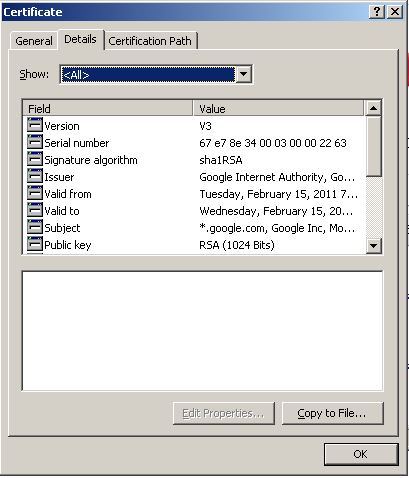
    Then, select Details | Copy To File, and it will launch a wizard to export the certificate to a file (I typically use Base-64 encoded X.509)


    Firefox
    Very similar process, but instead of clicking the padlock, you click the highlighted logo on the left side of the address bar.


    And then select More Information | Details | View Certificate | Export.


Friday, February 11, 2011

More clouds...

I recently stumbled upon a couple articles that I think do a pretty good job at providing some more clarity around 'cloud computing'.

Cloud computing service models by Dan Orlando (IBM developerWorks)

Cloud Computing - A Primer by T. Sridhar (Cisco Internet Protocol Journal)

These are not necessarily vendor-neutral, but do add some detail about common terms and characteristics to be aware of related to cloud computing. Things like:
  • elasticity
  • virtualization
  • resiliency
  • multi-tenancy
  • cloudbursting
Another thing that was covered is the movement towards standardization (which seems to be slow at best). The goal here is to minimize the effect of vendor-lock in (which is not really a motivator for most vendors).

However, there seem to be a couple efforts underway that look promising: